Why MikroTik CGNAT logging decides your DoT audit
If your ISP runs MikroTik routers behind CGNAT, your DoT IPDR compliance depends on one thing: can you name the subscriber behind a public IP, a port and a timestamp?
Most small and mid-size ISPs in India run MikroTik at the edge. It is affordable, flexible and well understood by local integrators. But RouterOS does not produce DoT-ready IPDR records on its own. Hundreds of subscribers share one public IP under CGNAT. Without the right MikroTik NAT syslog and flow export, a law enforcement request for “who used 203.0.113.10:51234 at 14:02” has no answer.
This guide is for ISP engineers and the MikroTik integrators who set up their networks. It covers what DoT expects from a MikroTik router, what to export, how to tie NAT and RADIUS logs to a subscriber, and the mistakes that surface only during an audit.
What DoT IPDR compliance needs from a MikroTik router
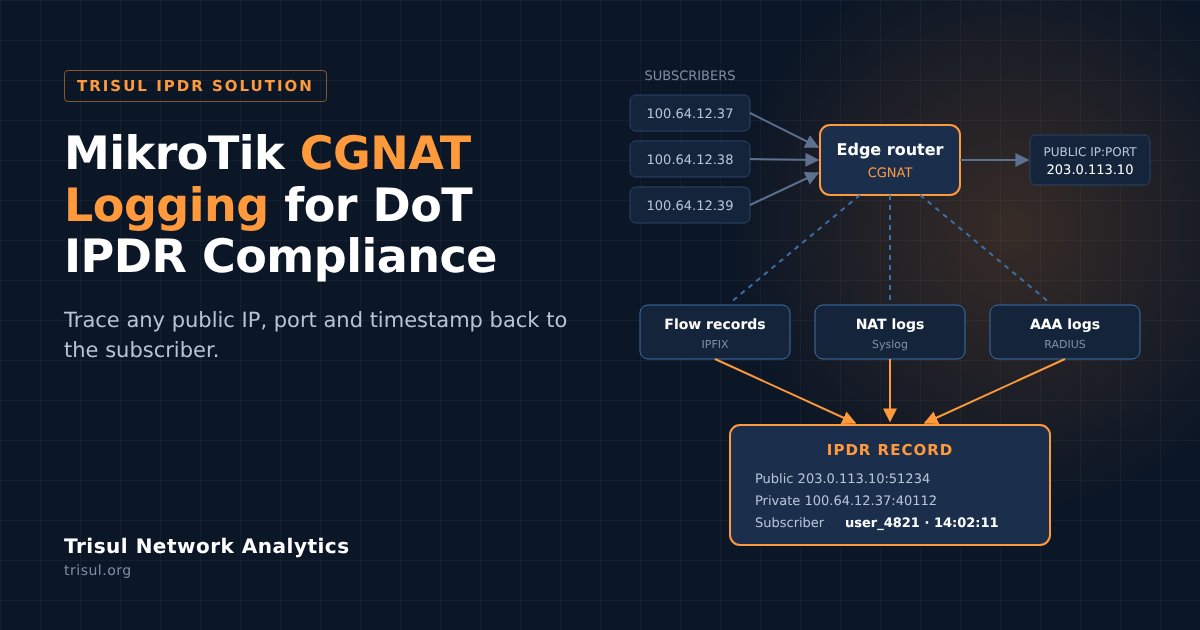
An IPDR record answers who, what and when for every session. Under CGNAT, no single log holds all three, so a compliant setup joins three sources:
| Source | What it gives you | MikroTik feature |
|---|---|---|
| Flow records | Source and destination IP and port, protocol, start and end time | Traffic Flow (NetFlow v9 / IPFIX) |
| NAT logs | Private IP:port mapped to public IP:port, with a timestamp | Firewall logging sent to remote syslog |
| AAA logs | Which subscriber held which private IP, and when | RADIUS accounting from your PPPoE or hotspot server |
The final report then needs the fields DoT asks for: protocol, source and destination IP and port, start and end time, NAT IP and port, user ID and the customer’s details. See the full field list in Format of the output report.
Miss any one of the three sources and the chain breaks. The flow shows a public IP, but nothing ties it to a person.
Setting up MikroTik Traffic Flow and NAT syslog for IPDR
You need two exports from each gateway router: flow records and NAT logs. Replace the collector IP and ports with your Trisul server’s values.
1. Export flows with MikroTik Traffic Flow (IPFIX)
Enable Traffic Flow on the gateway and point it at the Trisul collector. The full walkthrough, including cache and timeout tuning, is in our [MikroTik NetFlow configuration guide](https://www.trisul.org/devzone/doku.php/netflow:mikrotik).
/ip traffic-flow set enabled=yes interfaces=all cache-entries=4k active-flow-timeout=30m inactive-flow-timeout=15s
/ip traffic-flow target add dst-address=<trisul-ip> port=2055 version=ipfix
Leave packet sampling off for IPDR. A sampled flow export misses sessions, and a missed session is a record you cannot produce for an audit.
Export only from gateway routers and uplink interfaces, and skip fields IPDR does not need, as recommended in the NetFlow export guide for IPDR. This keeps storage and collector load down.
2. Send NAT logs over syslog
RouterOS can log every packet, which floods your collector. Log only new connections instead. Our step-by-step NAT syslog for MikroTik guide gives the exact firewall rule.
Then send those logs to Trisul with a remote logging action:
/system logging action add name=trisul target=remote remote=<trisul-ip> remote-port=<syslog-port>
/system logging add topics=firewall action=trisul
Cover both TCP and UDP. DNS, VoIP and gaming traffic run over UDP, and an audit request can name any of them.
3. Turn on the NAT Syslog app in Trisul
On the Trisul side, install the NAT Syslog app from WebAdmin → Manage → Apps (how to install Trisul apps). It parses incoming MikroTik NAT logs and maps them to flows. The NAT Syslog page in the IPDR guide covers the details.
Syslog-based NAT logging suits small and mid-size ISPs. At very high connection rates, plan collector capacity with the IPDR system requirements.
Tying NAT logs to subscribers with RADIUS
NAT logs tell you which private IP used a public IP:port. RADIUS accounting tells you which subscriber held that private IP at that moment. You need both.
Most MikroTik ISPs authenticate PPPoE or hotspot users against a RADIUS server, often FreeRADIUS. Export its accounting records every hour as CSV, with these fields:
radacctid,acctsessionid,acctuniqueid,customer_id,nasipaddress,nasportid,acctstarttime,acctupdatetime,acctstoptime,acctsessiontime,callingstationid,framed_ipv_4_address,framed_ipv_6_address,delegated_ipv6_prefixDrop the files into a directory on the Trisul server and run the trisul_aaaing ingestor on a cron schedule:
trisul_aaaing -c /usr/local/etc/trisul-hub/domain0/hub0/context0/trisulHubConfig.xml -d /ipdrdata/cdrlogs
Trisul matches AAA records to flows at query time, so the order of arrival does not matter. Full steps are in AAA and RADIUS and Programs and Scripts.
IPv6 subscribers. The same export carries framed_ipv_6_address and delegated_ipv6_prefix. If you run dual-stack, include them, so IPv6 sessions trace back to a subscriber just like IPv4.
Static IP customers don’t appear in RADIUS. Map them with Customer Inventory Mappings, and use Set Expiry instead of Delete when a customer leaves, so older reports still carry their details.
Common MikroTik CGNAT logging mistakes
These gaps stay hidden until an audit request arrives. We cover more in 4 mistakes ISPs make with DoT compliance.
- Logging only TCP. UDP sessions go unrecorded, and so do DNS, VoIP and many apps.
- Logging every packet. The collector fills with duplicates and drops logs under load. Log new connections only.
- Clocks out of sync. If the router, RADIUS server and collector disagree by even a minute, NAT and AAA records will not line up. Point every device at the same NTP server.
- NAT logs without RADIUS. You can map public to private IP, but not private IP to a person.
- No check that logs are arriving. A router reboot or config change can silently stop exports. Check daily that each router is still sending.
Before going live, work through the IPDR Production Checklist.
Example: tracing a subscriber behind MikroTik CGNAT
A request asks who used public IP 203.0.113.10, port 51234, on 12 October between 14:00 and 14:05. With flows, NAT logs and RADIUS in Trisul, the trace takes one query:
- Log in to the IPDR portal and open Submit Queries.
- Enter the IP 203.0.113.10, the port 51234 and a custom time frame of 14:00 to 14:05. Fields are combined, so each one narrows the result.
- Trisul matches the flow to the NAT log (private IP 100.64.12.37:40112) and the NAT log to the RADIUS session.
- The result shows the AAA user name, the subscriber ID and the customer’s details in one row.
- Export to Excel in the DoT format, or pull it with the IPDR Query API.
For larger requests, upload a file of IPs, or use ipdr_bulkquery.sh from the command line. If you would rather ask in plain language, AI-assisted IPDR queries turn a request into the same structured search.
For MikroTik integrators and consultants
Your ISP clients will ask you about DoT IPDR compliance, usually right after an audit notice. With Trisul you can deliver a complete answer on the MikroTik networks you already manage: the router config above, plus a DoT-ready IPDR solution behind it.
- See how one of India’s largest ISPs achieved DoT compliance with Trisul IPDR.
- Browse more IPDR use cases.
- Want to offer IPDR to your clients? Talk to us about partnering.
Run an ISP on MikroTik? Get started with Trisul IPDR or contact our team for a compliance review of your current setup.
FAQ: MikroTik CGNAT logging and DoT IPDR
- Does MikroTik support IPDR logging for DoT compliance?
Not on its own. RouterOS can export flows through Traffic Flow (IPFIX) and NAT events through syslog. An IPDR system such as Trisul collects both, joins them with RADIUS logs and produces DoT-format reports.
- Is NetFlow enough for CGNAT logging on MikroTik?
No. Flow records alone may not tie a public IP and port to the private IP behind it. Add NAT logs over syslog, and RADIUS accounting to identify the subscriber.
- How do I reduce MikroTik NAT syslog volume?
Log only new connections, not every packet. The NAT syslog for MikroTik guide shows the firewall rule.
- How long must ISPs retain IPDR logs?
Check the current DoT licence conditions for your category. In Trisul, retention is set per storage pool in the Hub configuration, and old data rolls off automatically. See the IPDR FAQ.
- Does this work for IPv6 subscribers?
Yes. Include the IPv6 address and delegated prefix fields in your RADIUS export, and queries accept IPv6 addresses.
- Can I use MikroTik with a RADIUS server other than FreeRADIUS?
Yes, as long as it can export accounting records with session times, the subscriber ID and the assigned IP. The AAA and RADIUS page lists the fields.