Why Cisco ASR CGNAT logging decides your DoT audit
If your ISP runs CGNAT on a Cisco ASR, your DoT IPDR compliance depends on one question: who was behind this public IP and port at this exact time?
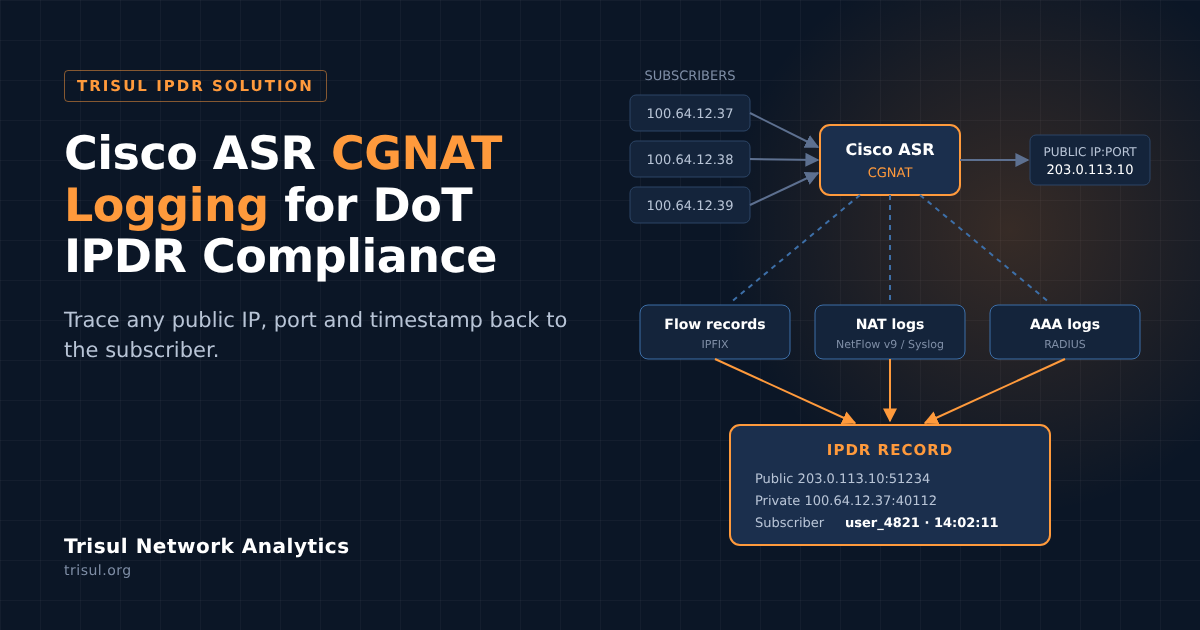
The Cisco ASR 1000 series sits at the edge of many Indian ISP networks. It can do carrier-grade NAT at scale, mapping thousands of subscribers onto a small pool of public IPs. But that same translation hides the subscriber. Without Cisco ASR CGNAT logging feeding a proper IPDR system, a request for “who used 203.0.113.10:51234 at 14:02” has no answer.
This guide is for ISP engineers and the Cisco integrators who build their networks. It covers what to export from the ASR, when to use NetFlow NAT events instead of syslog, how to tie NAT records to subscribers, and the mistakes that surface only during an audit.
What DoT IPDR compliance needs from a Cisco edge router
Under CGNAT, no single log answers who, what and when. A compliant setup joins three sources:
| Source | What it gives you | Cisco feature |
|---|---|---|
| Flow records | Source and destination IP and port, protocol, start and end time | Flexible NetFlow with IPFIX export |
| NAT logs | Private IP:port mapped to public IP:port, with a timestamp | NAT logging over NetFlow v9, or syslog |
| AAA logs | Which subscriber held which private IP, and when | RADIUS accounting from your BNG or AAA server |
The final report needs the fields DoT asks for: protocol, source and destination IP and port, start and end time, NAT IP and port, user ID and customer details. See Format of the output report for the full list.
Exporting flows from Cisco ASR with IPFIX
Use Flexible NetFlow with IPFIX export on the ASR’s uplink interfaces. The configuration has four parts: an exporter (where to send), a record (what to collect), a monitor (cache and timeouts) and the interface binding.
A trimmed exporter looks like this:
flow exporter trisul-exp
destination ipv4-address <trisul-ip>
source ipv4-address <asr-ip>
export-protocol ipfix
template data timeout 30
transport udp 2055
Our NetFlow configuration for Cisco ASR guide has the full template, including the record, monitor and interface commands.
For IPDR, trim the record to what DoT needs. The NetFlow export guide for IPDR recommends dropping interface fields, byte and packet counters, TCP flags and AS numbers. It also recommends the lowest sampling rate you can accept, because a sampled-out session is a record you cannot produce.
Cisco NAT logging: NetFlow NAT events vs syslog
The ASR can log NAT translations two ways. For CGNAT at ISP scale, NetFlow-based NAT logging is the better choice, and it is what Cisco recommends.
| NetFlow v9 NAT events | NAT syslog | |
|---|---|---|
| Format | Binary, template-based | Text lines |
| Load on router and collector | Lower | Higher at scale |
| Setup | One global command | A few logging commands |
| Best for | CGNAT, high connection rates | Smaller routers, devices without NetFlow NAT logging |
Option 1: NAT logging over NetFlow v9 (recommended)
One global command sends every translation event to Trisul. Unlike regular NetFlow, you do not enable it per interface:
ip nat log translations flow-export v9 udp destination <trisul-ip> 2055By default this logs source NAT and PAT, which is all CGNAT needs for subscriber-to-internet traffic. Trisul IPDR’s HalfNAT handling correlates these records with the destination IP from the flow data in real time.
For CGNAT deployments that need the destination in the NAT record itself, enable log-destination. You can also export over IPv6 and pin the source interface:
ip nat settings log-destination
ip nat log translations flow-export v9 udp ipv6-destination <trisul-ipv6> 30000 source GigabitEthernet0/0/3
ip nat log translations flow-export v9 udp destination <trisul-ip> 20000
Full details are in NAT logging for Cisco ASR.
Option 2: NAT syslog
For devices or IOS versions without NetFlow NAT logging, send translation create and delete events over syslog:
logging on
logging trap informational
logging host <trisul-ip>
ip nat log translations syslog
See Cisco NAT syslog configuration. On the Trisul side, install the NAT Syslog app from WebAdmin → Manage → Apps, as described in the NAT Syslog page of the IPDR guide.
Tying Cisco NAT records to subscribers with RADIUS
NAT records tell you which private IP used a public IP and port. RADIUS accounting tells you which subscriber held that private IP at that moment. Without it, the trail stops at an address.
Export accounting records from your AAA server every hour as CSV. Many ISPs run FreeRADIUS, and Trisul expects these fields:
radacctid,acctsessionid,acctuniqueid,customer_id,nasipaddress,nasportid,acctstarttime,acctupdatetime,acctstoptime,acctsessiontime,callingstationid,framed_ipv_4_address,framed_ipv_6_address,delegated_ipv6_prefixThen load them with the trisul_aaaing ingestor on a cron schedule:
trisul_aaaing -c /usr/local/etc/trisul-hub/domain0/hub0/context0/trisulHubConfig.xml -d /ipdrdata/cdrlogsTrisul matches AAA records to flows and NAT records at query time. See AAA and RADIUS and Programs and Scripts.
Dual-stack networks: include framed_ipv_6_address and delegated_ipv6_prefix so IPv6 sessions trace back to a subscriber too. Static IP and enterprise customers don’t appear in RADIUS; map them with Customer Inventory Mappings.
Common Cisco CGNAT logging mistakes
These gaps stay hidden until an audit request lands. More in 4 mistakes ISPs make with DoT compliance.
- Flow export without NAT logging. NetFlow shows the public IP after translation, but nothing links it back to the private IP.
- Syslog NAT logging at CGNAT scale. Text logs for every translation can overload the router and the collector. Use NetFlow v9 NAT events instead.
- Heavy sampling. A 1-in-1000 sample is fine for traffic analytics but misses sessions an audit will ask about.
- Clocks out of sync. If the ASR, RADIUS server and collector disagree by even a minute, records won’t line up. Point every device at the same NTP source.
- IOS upgrades that change the export. A software upgrade can change templates or reset logging. Re-check exports after every change window.
Before going live, work through the IPDR Production Checklist.
Example: tracing a subscriber behind Cisco ASR CGNAT
A request asks who used public IP 203.0.113.10, port 51234, on 12 October between 14:00 and 14:05. With flows, NAT events and RADIUS in Trisul, it takes one query:
- Log in to the IPDR portal and open Submit Queries.
- Enter the IP 203.0.113.10, the port 51234 and a custom time frame of 14:00 to 14:05.
- Trisul matches the flow to the ASR’s NAT event (private IP 100.64.12.37:40112) and that to the RADIUS session.
- The result shows the AAA user name, subscriber ID and customer details in one row.
- Export to Excel in the DoT format, or pull results with the IPDR Query API.
One of India’s largest ISPs runs this on NetFlow from 30 gateway routers across Cisco, Juniper, Nokia and A10, with queries answered in under 20 seconds. Read the case study.
For Cisco integrators and consultants
Your ISP clients will ask about DoT IPDR compliance, usually after an audit notice. With Trisul you can deliver the full answer on the Cisco networks you already manage: the router config above, plus a DoT-ready IPDR solution behind it.
- Running MikroTik too? See our MikroTik CGNAT logging guide. (link once live)
- Browse more IPDR use cases.
- Want to offer IPDR to your clients? Talk to us about partnering.
Run an ISP on Cisco ASR? Get started with Trisul IPDR or contact our team for a compliance review of your setup.
FAQ: Cisco CGNAT logging and DoT IPDR
- Should I use NetFlow or syslog for Cisco NAT logging?
NetFlow v9 NAT events for CGNAT at ISP scale. It is binary, lighter on the router and collector, and enabled with one command. Use syslog only on devices that don’t support NetFlow NAT logging.
- What command enables NAT logging over NetFlow on Cisco ASR?
ip nat log translations flow-export v9 udp destination <collector-ip> <port>. It applies globally, not per interface.
- Does Cisco NAT logging include the destination IP?
Not by default; it logs source NAT and PAT. Enable ip nat settings log-destination, or let Trisul’s HalfNAT handling correlate destinations from the flow data.
- Is NetFlow alone enough for DoT IPDR compliance?
No. Flows show post-NAT addresses. You also need NAT logs to reach the private IP, and RADIUS logs to reach the subscriber.
- Can Cisco export NAT logs to an IPv6 collector?
Yes, with the ipv6-destination option of ip nat log translations flow-export v9.
- How long must ISPs retain IPDR logs?
Check the current DoT licence conditions for your category. In Trisul, retention is set per storage pool and old data rolls off automatically. See the IPDR FAQ.